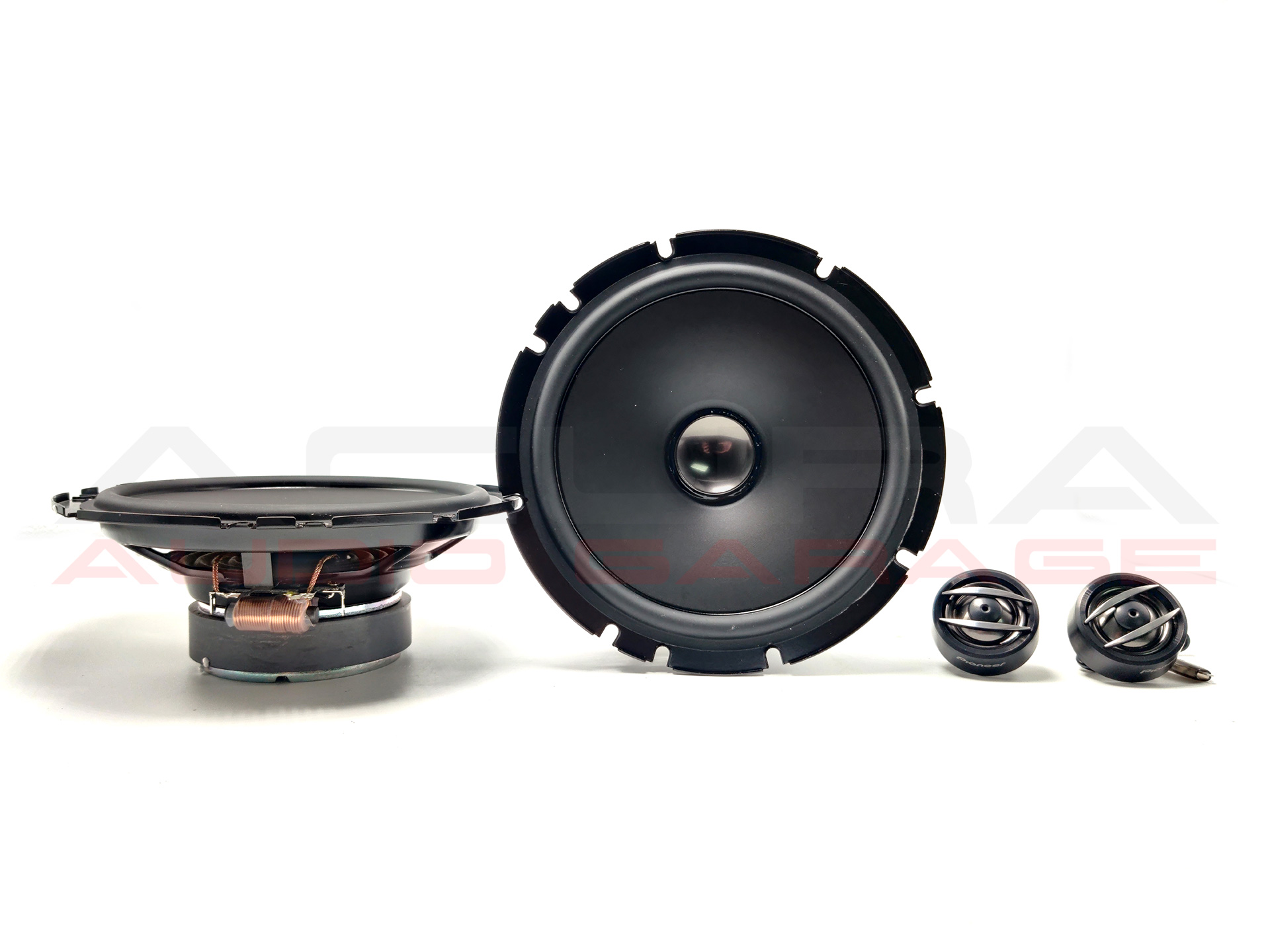
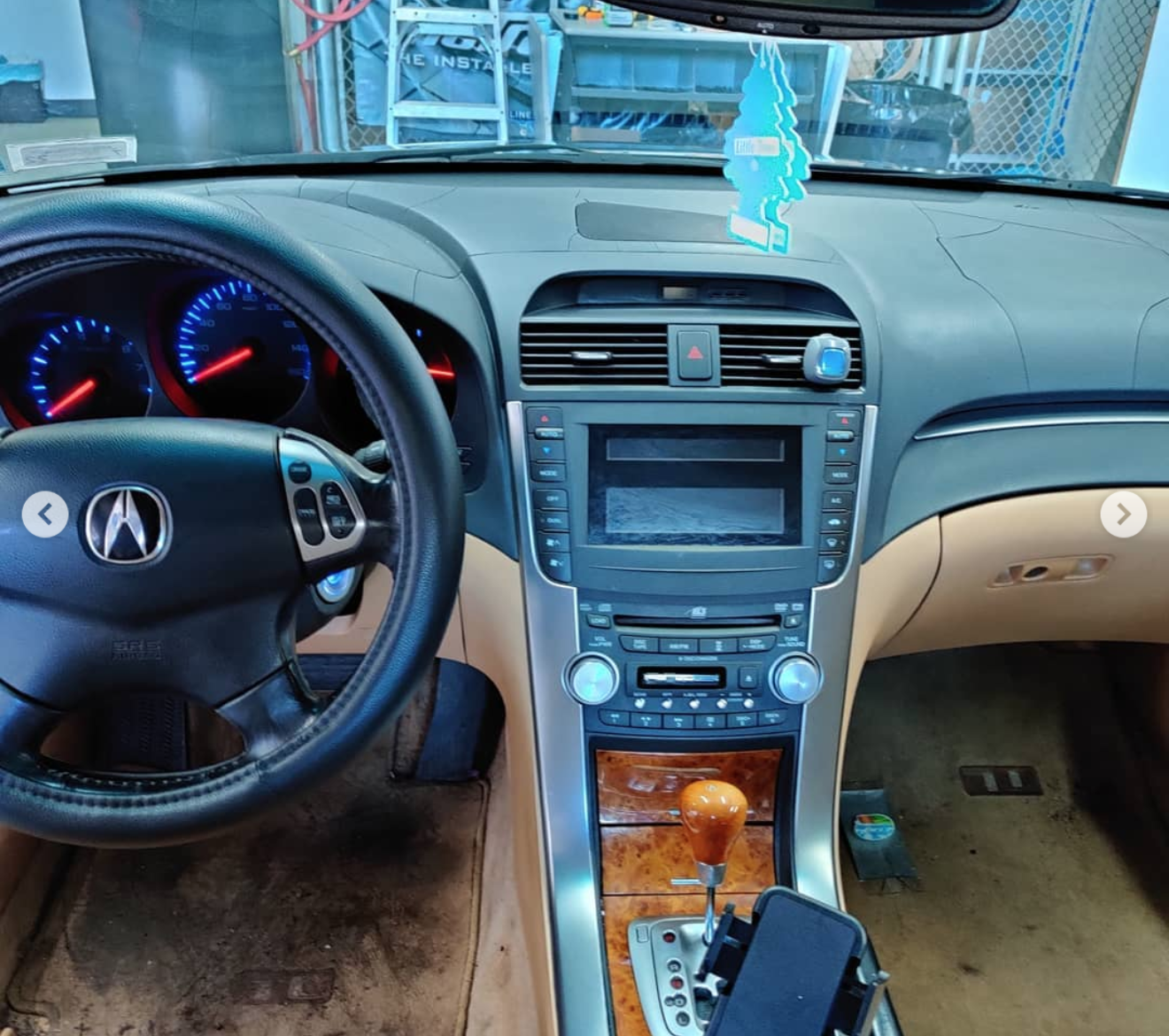
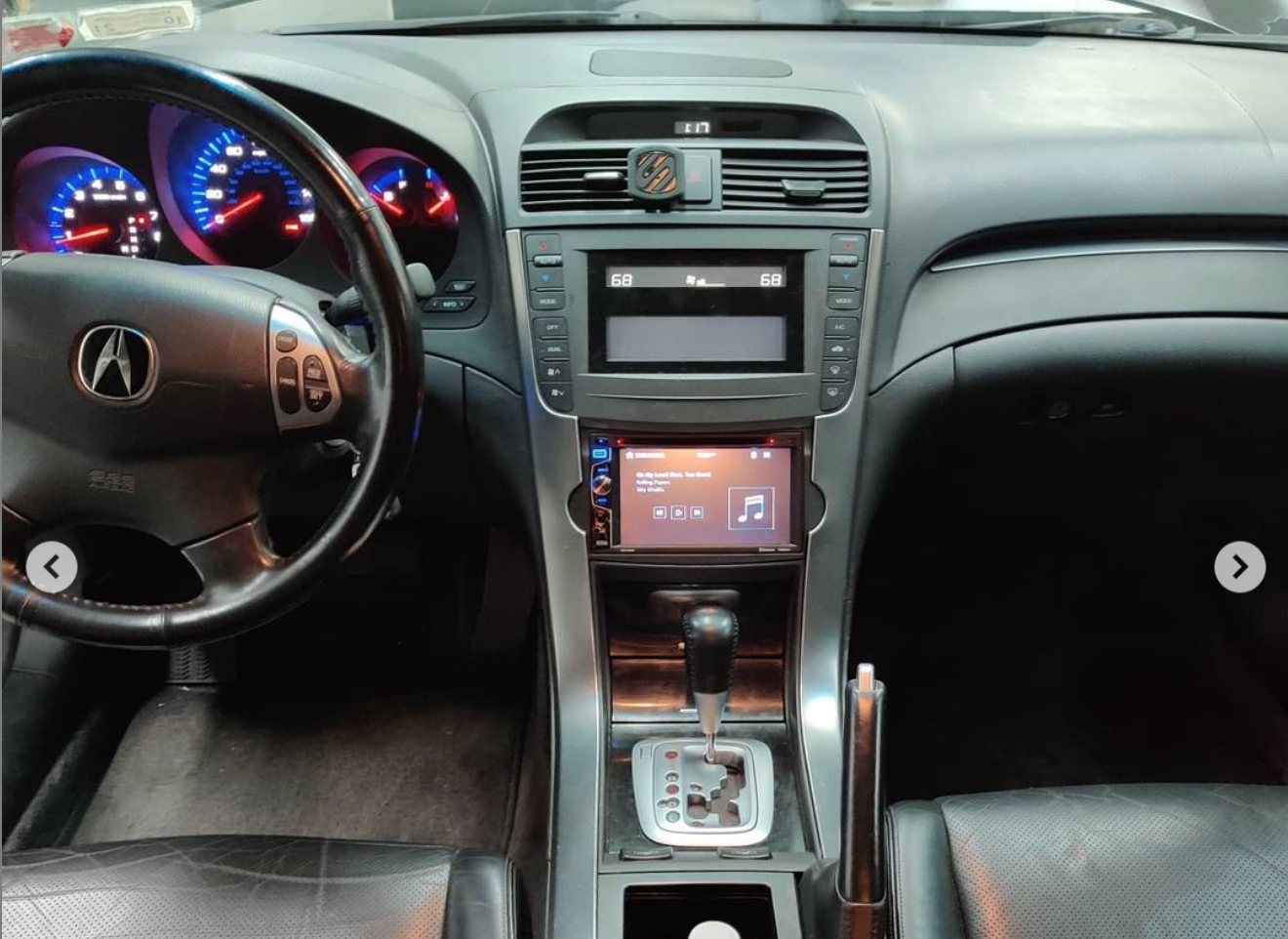
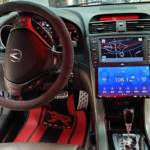
Acura Front Door 6.5 Kicker Component Speaker Set

If you are looking for speakers to replace the front factory speakers in your Acura TL or TSX without replacing the factory amplifier these speakers are a possible solution. These pair of speakers include a woofer, a tweeter and a crossover. All of these components will need to be installed to replace the front speakers in your Acura. Please verify your factory speakers are 4ohms or it will result in less overall volume from your factory amplifier.

These speakers have:

  • final impedance of 4 ohms
  • a frequency response of 35-21,000 Hz
  • power handling of 100 Watts RMS
  • sensitivity: 90 dB
  • passive crossover with tweeter
  • 6.5 Overall Footprint

These speakers include the necessary:

  • speaker spacers x2
  • speaker adapters x2
  • tweeter harness x2

To make installation a breeze. There is no wire cutting necessary installation is plug and play.

Noise Reduction Sound Dampening

If you are installing new speakers or a new subwoofer you may introduce unwanted rattle and noise to your vehicle. This unwanted rattle/noise can come from almost anywhere including door panels, rear deck covers, and trunk lids. This material is used to stop vibrations thus reducing and often eliminating unwanted noise/rattle. This material is easy to install all you have to do is cut to size and roll onto the material you want to eliminate noise from. It can be used on plastics, metals and wood. In order to apply this material you will need a roller.

This listing is for 3 sheets that will cover 12 inches x 34 inches of 4 sqft which is more than enough for the rear deck.

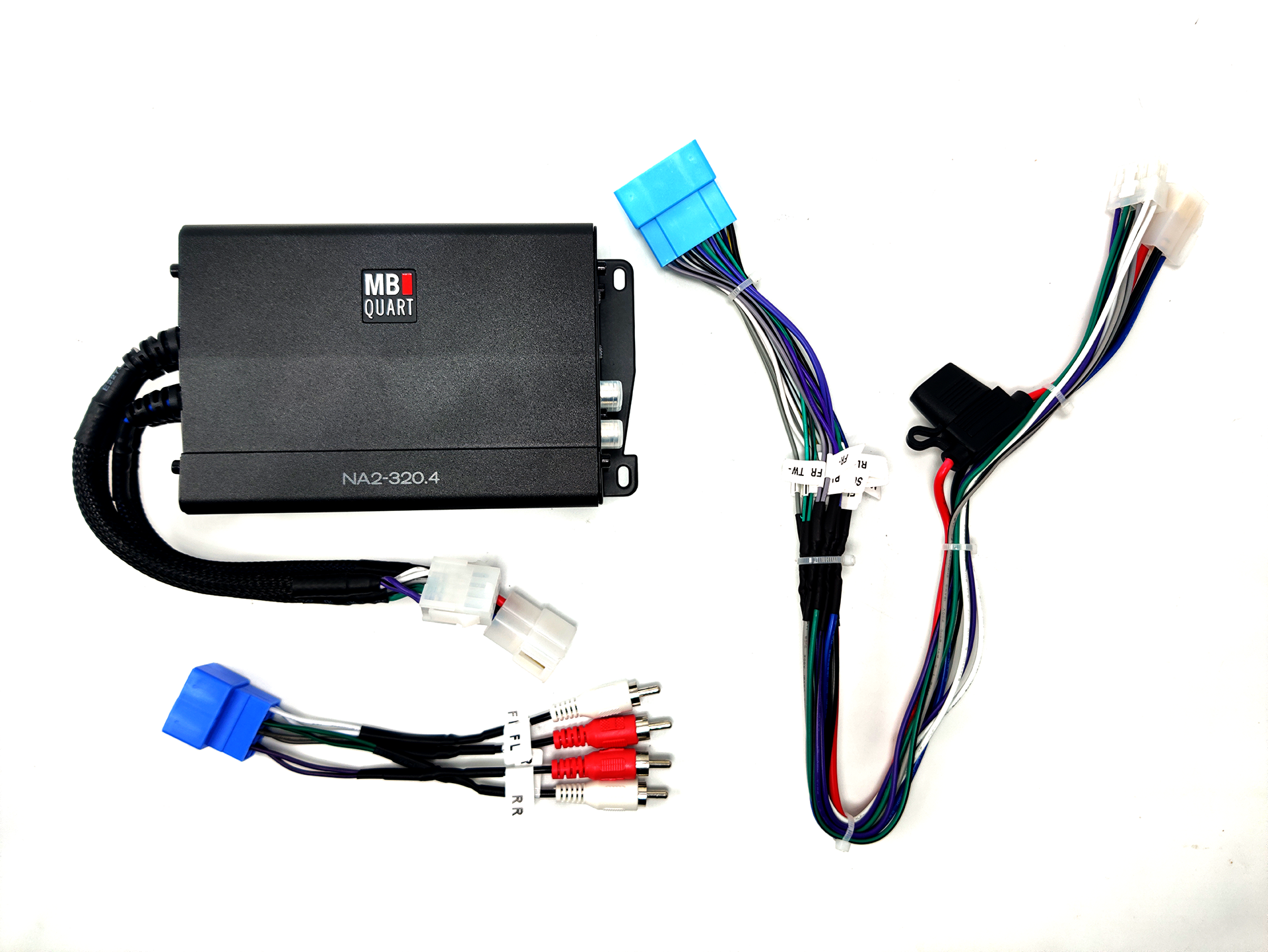
2004 05 06 07 2008 Acura TSX PNP Amplifier Upgrade

The first-generation Acura TSX, spanning the years 2004–2005, 2006–2007, and 2008, comes equipped with a factory amplifier located below the factory radio inside the dashboard. The factory audio system in the Acura TSX consists of 8 individual drivers, including the front speakers, the dashboard tweeters, the rear door speakers and the rear deck speakers.

When the factory amplifier is working with no issues, the factory audio system sounds rich and full. When your amplifier begins to fail or has failed, the system sounds tinny, and the volume output is very low. If you want to upgrade your sound system or if your factory amplifier has failed, this is a great option to consider. Our plug-and-play amplifier works with the factory radio or with an aftermarket radio if installed with our accessories. The plug-and-play amplifier will work with your factory speakers or aftermarket 4 ohm speakers. This is a four-channel amplifier that will retain all your speakers by bridging speakers together with a full range signal.

This upgrade is plug-and-play so it doesn’t require any new power or ground lines. When installing the amplifier, you don’t have to run any wires to the speakers or to the battery.

These are the amplifier power ratings.

  • 4 OHM Speakers: 80 Watts per channel – 80 watts divided by 2 is 40 watts to each individual speaker.

Impedance is rated in ohms. Impedance changes in a speaker as it begins to play music. For the best results, you want speakers that have a resting impedance of 4 ohms. The amplifier will automatically send as much power as it can to each speaker, depending on the impedance of that speaker. There is no switch or setting on the amplifier for changing impedances; it is handled automatically by the electronics inside the amplifier. To take full advantage of this amplifier, we recommend installing new aftermarket 4 ohm speakers that are full range for the all the doors and deck. We sell 4 ohm Kicker and Pioneer speakers but you can use speakers from any brand you prefer.

The factory amplifier powers each speaker with roughly 15–30 watts, depending on the speaker; this results in a total power output of 140 watts. This amplifier has a total power output of 320 watts. The factory speakers are all 4 ohms in final impedance, so if your factory speakers are all in good condition, the amp will make them sound great. If some of your speakers are blown and you didn’t notice it before, this amplifier will make you notice it now.

When installing the amplifier, we highly recommend upgrading the rear deck speakers. The rear deck speaker are used as subwoofers from the factory. When the amplifier is upgraded the signal going to the speaker changes from a sub signal to a full range signal. This causes the rear deck speakers to distort easier at higher volumes. As for the factory door speakers, we have found they can handle the extra power as long as the high-pass filter is turned on. The amplifier is shipped pre-configured, so you don’t have to turn any knobs or flip any switches. We ship the amplifier configured based on the selections you make on this page. When shipped, the amplifier will have the proper level set along with the correct high-pass and low-pass filters selected for your application.

This amplifier combines the front tweeter and front door speaker into one channel and sends them a full range signal. This full range signal may damage your factory tweeter so make sure to upgrade the tweeters or protect them with a bass blocker. You can find our tweeter harness here. The rear door speakers and rear deck speakers are combined into channels three and four. This means your rear deck speakers will work as full range speakers and not just subwoofers. For the best results you will want to upgrade the rear deck speakers to full range coaxial speakers instead of just subwoofers.

A quick breakdown on the configuration of the amplifier and the speakers in your TSX.

Speakers
Channel 1 = Drivers Door Speaker + Drivers Tweeter
Channel 2 = Passenger Door Speaker + Passenger Tweeter
Channel 3 = Rear Left Door Speaker + Rear Left Deck Speaker
Channel 4 = Rear Right Door Speaker + Rear Right Deck Speaker

Impedance
Channel 1 = 4 ohms + 4ohms in parallel final impedance at amplifier is 2ohms
Channel 2 = 4 ohms + 4ohms in parallel final impedance at amplifier is 2ohms
Channel 3 = 4 ohms + 4ohms in parallel final impedance at amplifier is 2ohms
Channel 4 = 4 ohms + 4ohms in parallel final impedance at amplifier is 2ohms

Speaker Sizes
Channel 1 = 6.5 woofer + 1/2 tweeter
Channel 2 = 6.5 woofer + 1/2 tweeter
Channel 3 = 6.5 woofer + 6×9 woofer
Channel 4 = 6.5 woofer + 6×9 woofer

The amplifier is packaged with a plug-and-play harness and all the accessories you need to install it. To install this amplifier, you will need to remove the pocket below the factory radio and the bezel around the shifter. After that you can unbolt the two bolts that secure the amplifier and remove it. Then you can proceed to unplug it and connect our plug-and-play amp in its place. The amplifier shares the same connectors as the factory amplifier, so no wiring is necessary. To mount the amplifier you will use the supplied bracket so that it mounts in the factory location with no problem. The new amplifier will fit in the factory location. After securing the amplifier maneuver the wiring harness behind the amplifier so they are not pinched when you install everything back.

While this amplifier is louder than the factory amplifier, it does not shake the doors off your car or make your window flex from the bass output. This amplifier is a great choice for someone who has a failing amplifier or wants just a little bit more volume from their vehicle. If you are looking to make your car show stopping loud, you will want to check out our other high-power plug-and-play amplifier. This upgrade will make your car noticeably louder, and you will feel the bass, but you must have realistic expectations.

Please read this disclaimer. The loudness of sound can be subjective from person to person, along with the quality of sound. Almost all of our customers who have bought this amplifier have loved it, but there have been a select few who claimed it was not louder than the factory or that it did not sound better than the factory. We do not accept returns because you don’t like how it sounds or because the amplifier is not as loud as you expected. If you want loud and clear sound, check out some of our higher-end amplifier options.

If, after reading this description, you feel that this package does not have enough power, you can use our amplifier bypass kit to easily install your own amplifier. Please keep in mind that if you are going to power each speaker with more than 125 watts RMS, then we recommend running new speaker wires and suggest you do not use our amplifier bypass.

If you have questions regarding shipping or product availability, please check out our FAQ section.

  1. Can I use the factory radio and factory speakers with this amplifier?
    Yes, you can use this amplifier with the factory radio and factory speakers.
  2. Can I use an aftermarket radio with this amplifier?
    Yes, but you must have installed that radio using our accessories.
  3. Can I use aftermarket speakers with this amplifier?
    Yes, we recommend using speakers from Pioneer or Kicker.
  4. Does the Chinese Android radio work with this amplifier?
    Yes, but you will not have fader and balance controls. And you must run new RCAs from the radio to the amplifier.
  5. Can I run this amplifier and another amplifier for subwoofers?
    Yes, you can split the RCA signal that is going to the amplifier and tap the blue wire to power your additional amplifier.
  6. Is this amplifier louder than the factory amplifier?
    Yes, this amplifier is louder than the factory amplifier.
  7. If my factory amplifier has low audio, is it the amplifier or the factory radio?
    If you are having audio volume issues, it’s almost always the amplifier.
  8. How do I know if my speakers are blown?
    If you turn your radio up and set the bass to +3, your speakers should not make any weird noises. If they do, they might be blown.
  9. How do I mount this amplifier?
    The amplifier comes with a mounting bracket that allows it to be installed in the factory location.
  10. What speakers should I upgrade if I get this amplifier?
    We recommend upgrading your rear deck speakers to full range speakers.

Acura Front Door 6.5 Pioneer Component Speaker Set

If you are looking for speakers to replace the front factory speakers in your Acura TL or TSX without replacing the factory amplifier these speakers are the solution. These pair of speakers include a woofer, a tweeter and a crossover. All of these components will need to be installed to replace the front speakers in your Acura.

These speakers have:

  • final impedance of 4 ohms
  • a frequency response of 34-48,000 Hz
  • power handling of 80 Watts RMS
  • sensitivity: 85db
  • bass blocking capacitor with tweeter
  • 6.5 Overall Footprint

These speakers include the necessary:

  • speaker spacers x2
  • speaker adapters x2
  • tweeter harness x2

To make installation a breeze. There is no wire cutting necessary installation is plug and play.

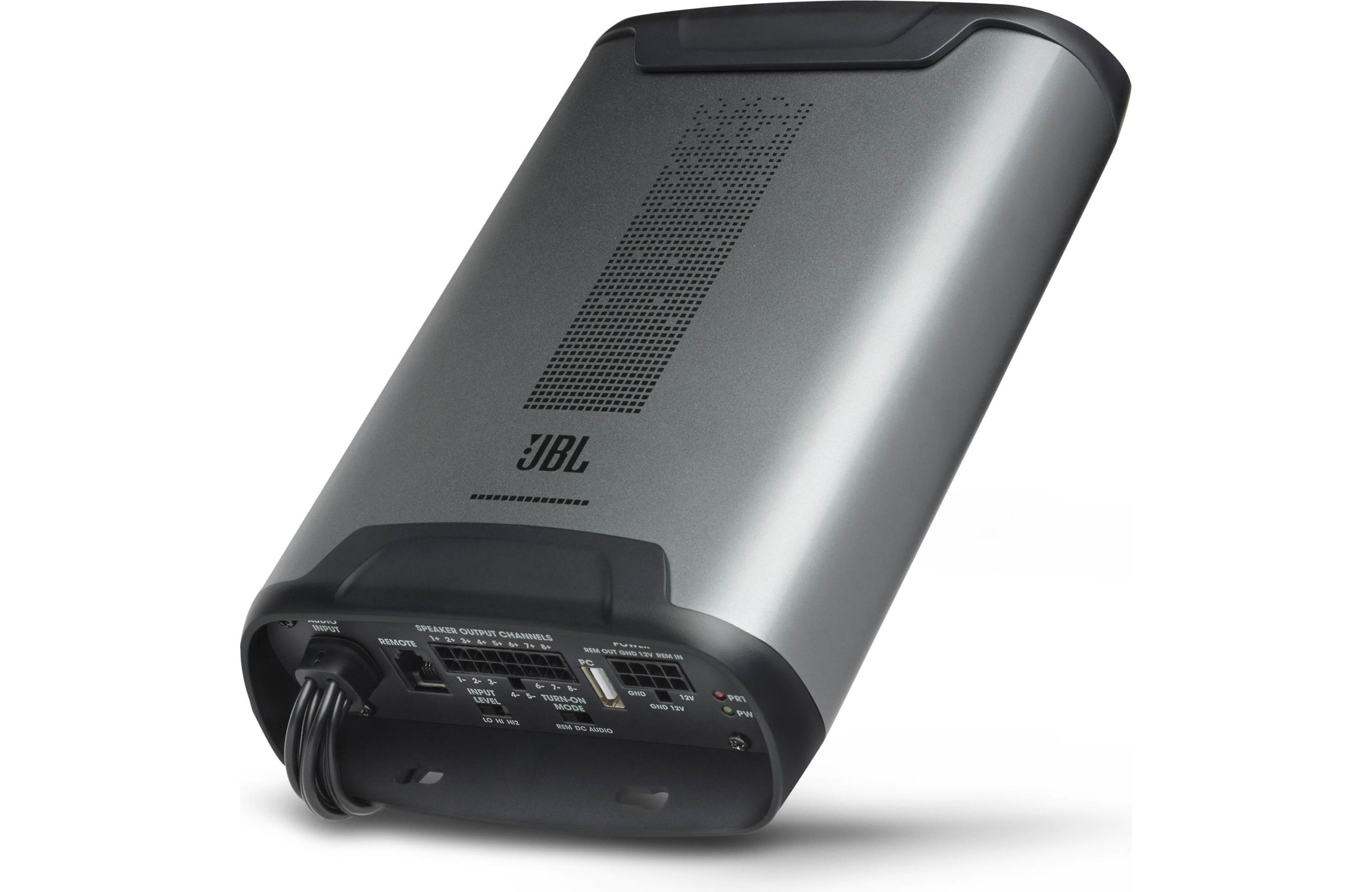
Acura ELS Audio 8 Channel DSP Plug and Play Amplifier

If you have an Acura with an amplified system this JBL DSP Amplifier is perfect to take your system to the next level without sacrificing sound quality or loosing any speakers. This amplifier is configured according to your selections in the drop down menus. If you wish to change the configuration of the amplifier you will need to hook it up a computer and install the JBL software.

Before we jump into the great features of this amplifier let’s talk about that bad features. The software used to tune this amplifier can easily confuse and frustrate anyone trying to make changes. The software used to tune this amplifier is difficult to install properly and only runs on windows. This amplifier can only be tuned through a wired connection with the provided USB cable. This amplifier has no mobile app for on the fly remote tuning. We offer remote tuning with our own provided tablet so that you don’t have to deal with the software if you don’t want to.

Alright now that we covered the bad lets cover the good. The DSP in this amplifier is great. It allows you to sum any channels together adjust the crossover points, the gains and even setup time alignment. This amplifier is a great choice for replacing the factory amplifier in almost any Acura including those with navigation. This amplifier has 8 channels of output which make it great for retaining all of your factory speakers and also adding an additional amplifier for subwoofers. This amplifier has a remote in and remote out so you can power other accessories. You can delay the remote out so that the other amplifier turns on after this one does. This amplifier comes with a bass control so when configured channels 7 and 8 will be adjusted by the bass knob.

We recommend this amplifier for use in your Acura TL, TSX, MDX. This amplifier can be used with Acura’s with navigation. This amplifier may require a new power line to the fuse box of your Acura depending on your configuration. Any vehicle with navigation will require a new power line to the cabin fuse box. The power line will be provided to you with the amplifier.

This amplifier is a class D amplifier that utilizes up to 40 amps of current to power each of its 8 channels with 60 watts of output at 2ohms and 40 watts of output at 4 ohms. This amplifier can be configured to power tweeters, midranges, full range speakers and subwoofers. This amplifier will improve your sound stage and provide great clean highs and nice full lows. This amplifier can power your factory subwoofer with 60 watts of power but can power an aftermarket subwoofer with 120 watts of power. Therefore a subwoofer upgrade is recommend if you plan to get the most out of the amplifier.

While this amplifier can be installed just by plugging in the connectors. In some use cases additional wiring made need to be run to the battery, fuse box or subwoofer to achieve the full power this amplifier has to offer. This amplifier is fully customized for each use case so we will reach out to you via text after your purchase to confirm the configuration and your intended use. Please provide a valid phone number so we may reach out during checkout.

This amplifier will come with everything you will need to install it. Including any additional wires that may be needed to complete the installation for your exact configuration. This amplifier will fit in the factory location of your factory amplifier. Only in Acura with the ELS audio system will both amplifier remain plugged in. In these cases you might have to mount both amps together awkwardly or relocate one of them below a seat.

Posted on Leave a comment

POST Aftermarket Radio Installation Questions

After upgrading your radio you may be experiencing some issues. The most common issues we are aware of are speaker hissing, speaker whining, steering wheel controls not working, no audio, no power and power cycling issues.

  1. Aftermarket Radio speakers hissing
    If your speakers are hissing or whining your first step is to thoroughly clean and tighten the battery terminals. This seems trivial but will cause the speakers to hiss. If cleaning the battery terminals did not help the next step is to disconnect the factory center dash speaker. You can disconnect this speaker by carefully prying up the grill above the clock and reaching into disconnect the speaker. That speaker is usually the only one hissing after you upgrade the radio.
  2. Aftermarket Radio whining coming from speakers
    The whining is most likely alternator feedback and if you hear it through every speaker than it most likely indicates that your factory amplifier is bad/going bad. Even though with the factory radio you did not have this issue if you encounter it after upgrading the radio it is still the amp and not the radio. If you only have whine in one speaker then it could be a bad RCA port or RCA cable but if its in all speakers then you will need to replace the factory amplifier with another used one, have yours repaired or replace it with another amplifier all together we have PNP amps and amp bypass harnesses available.
  3. Aftermarket Radio steering wheel controls not working
    If your steering wheel controls aren’t working then the process of elimination to get them working is as follows. If you have a Kenwood make sure the blue/yellow wire connected to the brown wire (with headphone jack). If you have a radio where the 3.5mm headphone jack plugs straight into the back of the radio make sure the plug seated all the way in. If the connections are correct and secure then your next step is programming.We recommend and only sell the AXSWC so if you are using another module you will need to look for specific instructions of that modules. The AXSCW has a reset button that you must activate is programming wasn’t successful on the first try. All you need to do is hold the programming button for 3 seconds and then let go. The button is on the same side as the LED light it is in the other hole form the LED. After you held the button for three seconds and let go it will begin to flash red/green very quickly. Now press and hold volume up on the steering wheel. The led will flash several times with red and green flashes slowly then quickly, then finally it will turn solid red after about 15 seconds. Once it does release the volume up button cycle the key on and off and the controls should begin working. If they do not work you will need to switch the radio mode or manually program. You can find more information on the AXSCW product page.
  4. Aftermarket Radio no audio
    If you have no audio after installing an aftermarket radio this is most likely because the factory amplifier is not turning on. First verify you have connected the blue/white wire often labeled remote/amp on from your aftermarket radio the corresponding wire on the grey plug from the accessories we sent you. If this occurs on a plug and play harness it is often due to the manufacturer changing the location of the pin with the blue/white to another location. Verify that the harness we sent you and the harness that came with your radio have the wires in the same locations. If the blue/white wire is in a different location then that is issue. You can either unpin the wire or cut and connect and that will get your sound working. If this is something you rather not do then you can send the harness back to us so we can fix it. The shipping will be covered by us. If your connections are correct but you still aren’t getting sound check the settings of the radio to make sure the amplifier setting is set to on or sometimes it’s a setting call subwoofer that you need to make sure is on to enable the amplifier to work. If none of these solutions work for you please call or email us so we can help fix the issue.
  5. Aftermarket Radio sound only form 3 speakers
    If you only have audio out of certain speakers and not others check the connectors for any bent pins or any pins that are starting to come out of the harness this can happen and cause a bad connection or speakers to short out. When you connect the connectors to the factory harness or to the aftermarket radio you should hear a click and encounter some resistance but it shouldn’t take all the force you have to get the connector to come together. If everything checks out but you still have low or faulty audio a component in the harness could be bad or your speakers/amplifier could be bad reach out to us for your next steps.
  6. Aftermarket Radio not turning on
    If you have no power to your new aftermarket radio don’t panic this is often because you blew a fuse during installation. This is common and why often it is recommend to disconnect the battery before installation. Check the fuses at the passenger kick panel look for the radio and accessory fuse to verify they are both good. If you still have no power check the fuse on the back of the aftermarket radio usually right where the connector for the radio connects. If you still have no power you must check the fuses under the hood for blown fuses. The Acura system is very tied together so a fuse that may have nothing to do with the radio directly will cause it not to turn on. Check every single fuse if you cannot get power to the radio. If you connect the factory radio back (make sure to input the radio code) and it does work but the aftermarket radio does not then it might just be a bad or dead radio. You can also test the connectors for power if you have a multimeter to verify that the yellow wire has 12v and the red wire has 12v when you turn the key on.
  7. Aftermarket Radio keeps shutting off by itself
    If you installed an aftermarket radio and the radio keep shutting off as you are driving or when you hit a bump. This means one of the connections is not seated properly or there is a fault. You can test for faults with a multimeter and set it to continuity than begin turning and twisting the harness while check if the continuity stops. Before the continuity test make sure all the connectors are seated properly as that can also cause an issue.

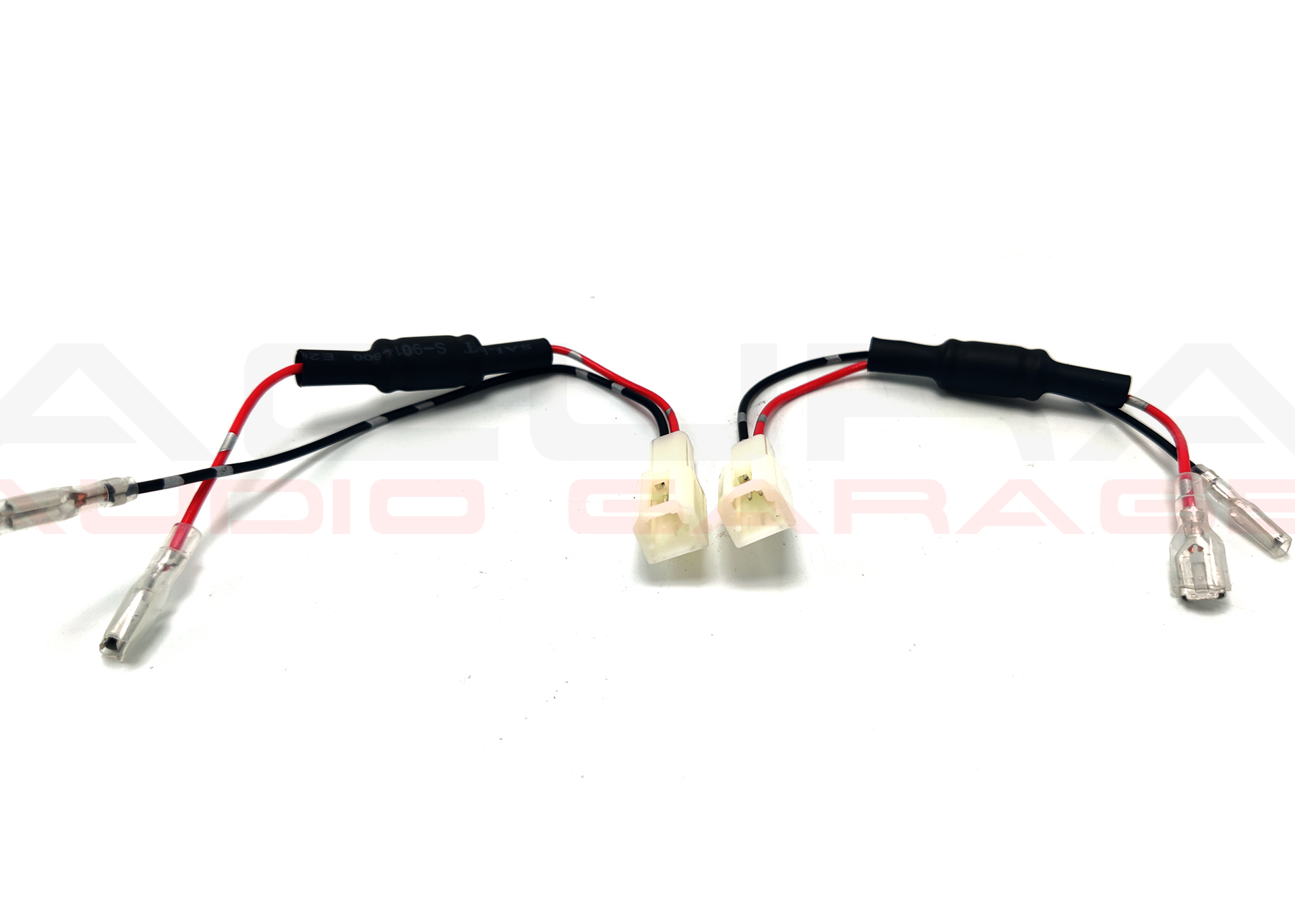
Acura Tweeter Speaker Harness Adapters

When you are replacing the tweeters on your Acura the tweeters have there own bass blocking capacitor on them. There is no crossover in place for the tweeter instead it uses a capacitor to filter out lower frequencies and not damage the tweeter. When you replace this tweeter you will either need to run new speaker wire from your crossover to your tweeter or you can use our harness.

This harness comes with a aluminum electrolytic capacitor that is rated for 100v and 15uf brining the crossover point to right about 3500-4500hz for tweeters of 2-4 ohms. This means you can safely install your new tweeter with ease and not having to worry about running any new wiring. This listing contains 2 harnesses.

This adapters are verified working for

    • 2013 2014 2015 2016 2017 2018 2019 2020 2021 2022 Acura ILX
    • 2015 2016 2017 2018 2019 2020 Acura TLX RLX
    • 2007 2008 2009 2010 2011 2012 2013 2014 2015 Acura MDX
    • 2004 2005 2006 2007 2008 2009 2010 2011 2012 2013 2014 Acura TL
    • 2004 2005 2006 2007 2008 2009 2010 2011 2012 2013 2014 Acura TSX
    • 2007 2008 2009 2010 2011 2012 2013 2014 2015 Acura RDX
    • 2006 – 2020 Honda Civic
    • 2008 – 2017 Honda Accord
    • 2011 – 2016 Honda Pilot
    • 2003 – 2019 Honda CR-V
    • 2016 – 2021 Honda HR-V

They may fit these other Acura models but we have not been able to confirm fitment ourselves.

Acura Aftermarket Radio Upgrade

Are you thinking about replacing the radio in your Acura? Replacing the radio in your Acura is hard work and can be very tedious but with our wiring harness all you have to do is remove and install the new radio.

THERE IS NO WIRING NECESSARY. All you have to do is plug in the connectors to their matching partners and install the radio.

OUR WIRING HARNESS ARE PLUG AND PLAY AND ELIMINATE THE NEED FOR ANY

  • wiring cutting
  • wire splicing
  • wire tapping

Our wiring harness are custom made to the radio you choose. All we need is the radio model and we can create the harness for your Acura and radio selection. We recommend radios from name brands like Kenwood, Pioneer, Sony and Alpine but any radio with 6 RCA ports will work.

Our customers save time and frustration by utilizing our harnesses, radio kits and complete kits to upgrade the factory radio in their Acura.

What are customers are saying

The Pioneer wiring harness is PERFECT!

I loved the wiring harness for my new Pioneer head unit. It saved me from the headache of having to wire everything on my own. Thanks again!

Huge time saver

Literally plug and play. I’d recommend this to anyone, it couldn’t be more simpler than this. I spent more time disassembling the dash than wiring where as before it would have taken much longer. Everything works as it should. Highly recommend


Get your harness today. Buy Now

2007 08 09 10 11 12 2013 Acura MDX Aftermarket PNP Radio Complete Kit

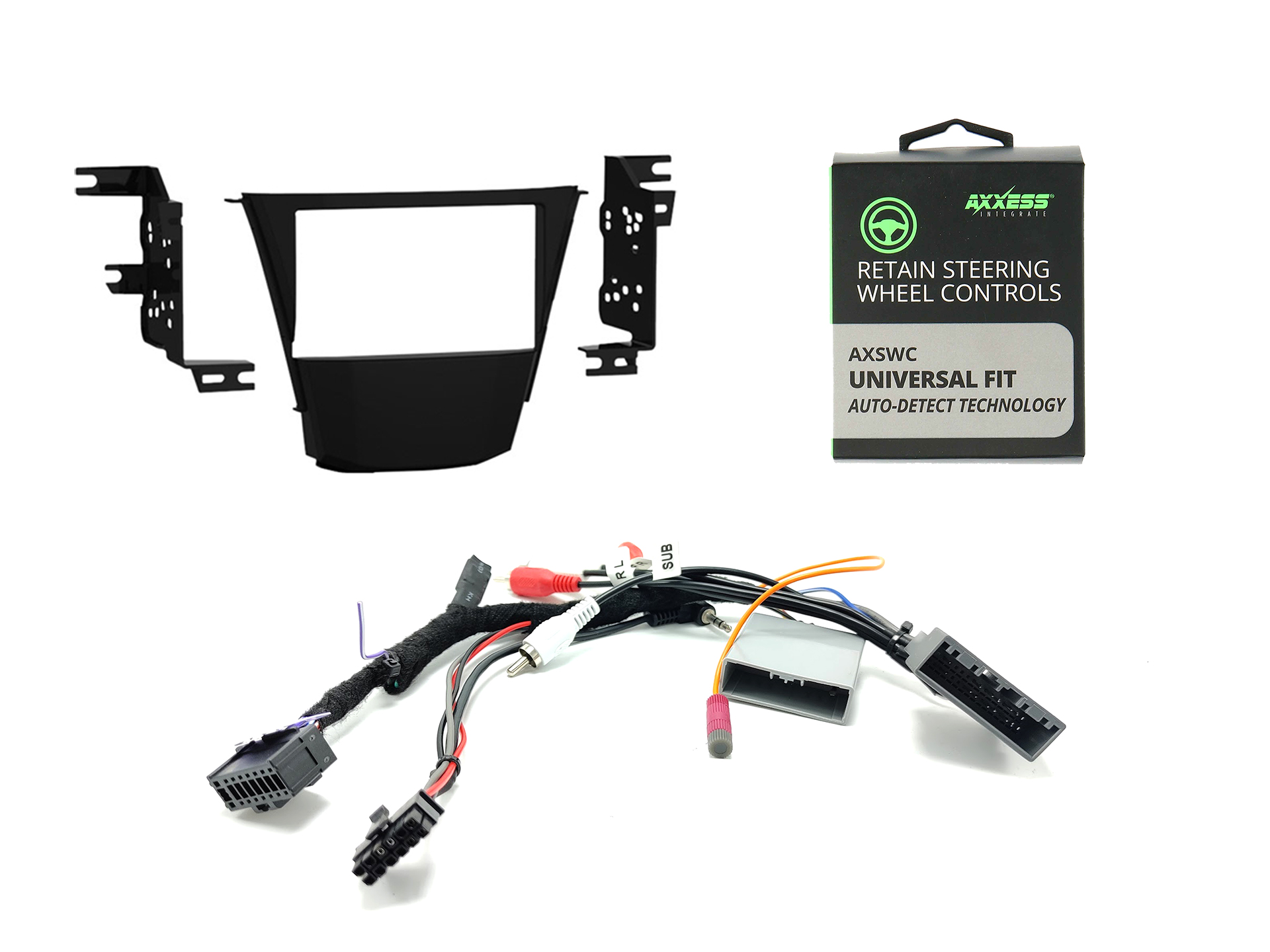
Simplify installing an aftermarket in dash stereo receiver in your 2nd generation Acura MDX covering years 2007 2008 2009 2010 2011 2012 and 2013 with our radio installation kit. Our aftermarket radio install kit is complete with everything you will need to install a new stereo in your Acura MDX. This kit does not include a radio. Our kit includes all the necessary components to install an aftermarket radio in your Acura. These components are a dash kit, a custom made wiring harness, the ELS Amplifier Retention and the AXSWC steering wheel control interface. Our custom harness allows you to have a plug and play installation with a supported compatible radio, the dash kit allows you to install a new radio in the factory location, the ELS amplifier interface allows you to keep the factory amplifier and the AXSWC allows you to control the aftermarket radio with your factory steering wheel controls.

A parking bypass is highly recommended with your order if your radio brand is Pioneer, Kenwood or Alpine. You can learn more about the bypass and add one to your cart using this link.

Your Acura MDX without navigation has a total of 6 speakers that are powered by the factory amplifier. When replacing the factory radio using our complete kit you are able to keep all of the speakers except the center channel. The front door speakers, tweeters, rear deck speakers and the factory subwoofer will all continue to work; the center dash speaker will not work. You will also lose the factory hands free functionality and the factory XM functionality. Our harness integrates with the factory amplifier to keep all your speakers working. If your factory amplifier does not work this kit will not work.

Your Acura MDX with navigation has a total of 8 speakers that are powered by factory amplifier. When replacing the factory radio using our complete kit you get to keep all the speakers including the factory subwoofer, door speakers, center speaker and tweeters. Our harness along with the amplifier interface allows you to keep the factory amplifier and keep all your speakers working. Your factory backup camera will continue to work but you will not be able to control the navigation. In the 2007-2009 MDX you will also need the factory navigation to not loose power to keep your camera working. In the 2010-2013 Acura MDX the backup camera is directly wired to the factory screen so it will continue to work. You will also lose the factory hands free functionality and the factory XM functionality. The rear entertainment will also no longer work.

When replacing the factory radio you will lose Sirius XM and the factory handsfree link functionality. The steering wheel controls including volume up, volume down, next, previous and mode will work. The call control buttons are not retained. The navigation control buttons are not retained. The components included in this complete install kit are:

  • Custom Made Wiring Harness
  • ABS Molded Dash Kit
  • AXSWC Steering Wheel Control Module
  • ELS Amplifier Interface for NAV models (instructions here)

In order for your aftermarket radio to be compatible with this harness it must have at least 5 RCA outputs including FL, FR, RL, RR, and SUB. Also the brand of the aftermarket radio must appear in the selection menu of this listing. If you are unsure if your radio qualifies please call us at 877-542-2872

In order to complete your order we may need your radios model number please include it in the billing checkout notes or if you forget please include a valid phone number where me may reach you in case of any questions.

Disclaimer: You will have to wiretap the illumination wire of your factory wiring for automatic radio dimming unless you purchase a radio which does not require an illumination trigger.

FAQ

  1. Can I add an amplifier and subwoofers with your harness?
    – Yes you can. You will just need run your RCAs to the back of the radio and wire tap the blue or blue/white wire of the harness.
  2. Can I add a backup camera with your harness?
    – Yes just follow the instructions provided in the radios owners manual or the cameras manual to complete the installation.
  3. Can I use a random radio I found on Amazon or eBay that has an unknown brand?
    – Most likely not. If the radio you purchased on Amazon is less than $100 it most likely won’t have all the features and ports needed for you to complete the installation.
  4. Do I get to keep all my speakers?
    – Yes all speakers are retained. On non nav models the center dash speaker is lost.
  5. Do I get to keep my steering wheel controls?
    – Yes but an additional part is required. The AXSWC in included in this kit. You will get to keep volume up, volume down, next, prev and mode. The call control buttons will not be retained.
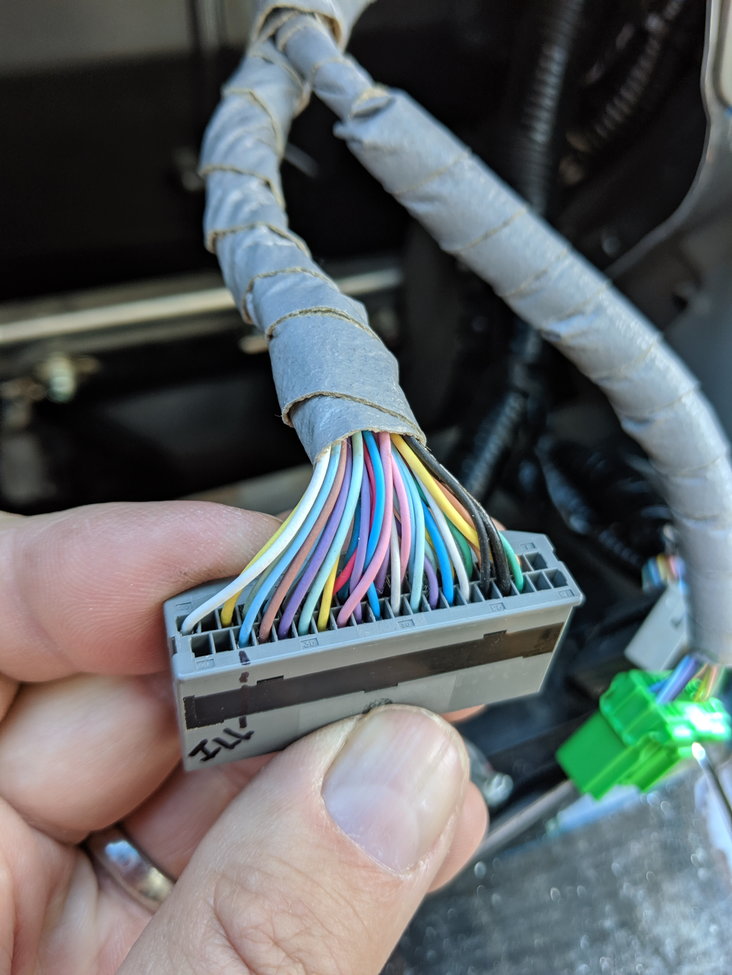
  6. How do I get the radio to dim when I turn on the headlights?
    -You will need to wire tap the wire show in this picture and attach it to the orange or orange/white wire in your harness.

2007 08 09 10 11 2012 2013 Acura MDX Aftermarket PNP Radio Wiring Harness

If you are having trouble wiring a new aftermarket radio in your 2nd Generation Acura MDX spanning years 2007 to 2009, 2009 to 2011, or 2012 to 2013 then this custom made wiring harness will solve your issue. Our wiring harness to connects to your aftermarket radio and integrates with the factory amplifier in your Acura MDX to power all of your speakers. This harness is compatible with Acuras that have the premium sound system(base) or the ELS sound system(tech package with navigation).

In the base or premium sound system this harness uses the RCAs to send a low level signal to the factory amplifier. The harness is also wired with the lead to turn on the factory amplifier when you are playing audio. The harness eliminates the need for any wiring splicing or wire cutting. It makes you installation plug and play. If you do wish to keep the steering wheel controls you will need an additional part.

In the tech package with navigation and the ELS audio system our harness uses RCAs along with the ELS amplifier interface to keep your factory amplifier and power all of your speakers. The ELS audio system requires the ELS Amplifier Interface to manipulate the factory amplifier volume. If you do not use the ELS interface you will have power and audio but you will not be able to achieve full volume with your aftermarket radio. This harness makes your installation plug and play and requires no additional wiring.

*DISCLAIMER FOR ACURA TSX WITH NAVIGATION*
When you install an aftermarket radio in your Acura MDX you will lose the factory navigation functionality and the backup camera. If you want to retain the factory backup camera then you will also need to to purchase the camera retention harness. This harness will allow you to view the factory backup camera on your new aftermarket screen. When you keep the factory camera you will need to wiretap the reverse trigger. You will also need to install the ELS Amplifier volume knob in an accessible area to control the volume of your system. Please watch the clips below.
*END DISCLAIMER*

When you replace the factory radio in your Acura MDX you will lose some factory components. Those components include Sirius XM Radio, Factory Hands Free Calling and streaming, Factory Navigation Guidance, Acuralink, USB port, and the factory AUX Port. If you want Satellite radio you will need an extra tuner as you cannot use the factory one. Your new aftermarket radio will have Bluetooth streaming and calling along with USB and AUX.

After placing your order we will create a custom wiring harness for your exact radio installation. The custom harness will allow you to install a new aftermarket radio without the need for any wire splicing or wire tapping. This harness will allow you to have a plug and play installation for your Acura TSX with a supported compatible radio. A parking bypass is highly recommended with your order if your radio brand is Pioneer, Kenwood or Alpine. You can learn more about the bypass and add one to your cart using this link.

Our plug and play harness integrates with the factory amplifier to retain your center speaker (tech only), front door speakers and tweeters, the rear door and rear deck speakers and the factory subwoofer. Included in our harness are the necessary three connectors for your Acura MDX and the radio specific connector that will plug into the back of your radio. Our harness uses RCAs to feed a low level signal from the aftermarket radio to the factory amplifier. We also add the connector for the AXSWC steering wheel control interface so you can retain your factory steering wheel controls if desired. The AXSWC is an additional purchase it is not included. The wiring for the AXSWC is completed so if you do purchase it you can just plug it in. You can find the AXSWC here. The ASXWC allows you to retain volume up, volume down, next, previous and mode on your steering wheel but not the call control buttons with your aftermarket radio.

In order for your aftermarket radio to be compatible with our harness it must have at least 5 RCA outputs including FL, FR, RL, RR, and SUB. Also the brand of the aftermarket radio must appear in the selection menu of this listing. If you are unsure if your radio qualifies please call us at 877-542-2872.

In order to complete your order we may need your radios model number please include it in the billing checkout notes or if you forget please include a valid phone number where me may reach you in case of any questions.

In order to complete your order we may need your radios model number please include it in the billing checkout notes or if you forget please include a valid phone number where me may reach you in case of any questions.

FAQ.

  1. Will your harness allow me to keep the factory subwoofer working?
    – Yes this harness integrates with the factory amplifier to keep your factory subwoofer working.
  2. Can I add an amplifier and subwoofers with your harness?
    – Yes you can. You will just need run your RCAs to the back of the radio and wire tap the blue or blue/white wire of the harness.
  3. Can I add a backup camera with your harness?
    – Yes just follow the instructions provided in the radios owners manual or the cameras manual to complete the installation.
  4. Can I use a random radio I found on Amazon or eBay that has an unknown brand?
    – Most likely not. If the radio you purchased on Amazon is less than $100 it most likely won’t have all the features and ports needed for you to complete the installation.
  5. Do I get to keep all my speakers?
    – Yes all speakers are retained, except for the center dash speaker.
  6. Do I get to keep my steering wheel controls?
    -Yes but an additional part is required. The AXSWC you can find it here. You will get to keep volume up, volume down, next, prev and mode. The call control buttons will not be retained.
  7. How do I get the radio to dim when I turn on the headlights?
    -You will need to wire tap the wire show in this picture and attach it to the orange or orange/white wire in your harness.

*When replacing the factory radio in your Acura you will loose the factory Sirius XM, HFL and AUX Port. If you want automatic dimming when you turn on your headlights you will have to wiretap the illumination wire of your factory wiring unless you purchase a radio which does not require an illumination trigger.*

2006 07 08 09 10 2011 Honda Civic Acura CSX LX EX SI PNP Wired Harness

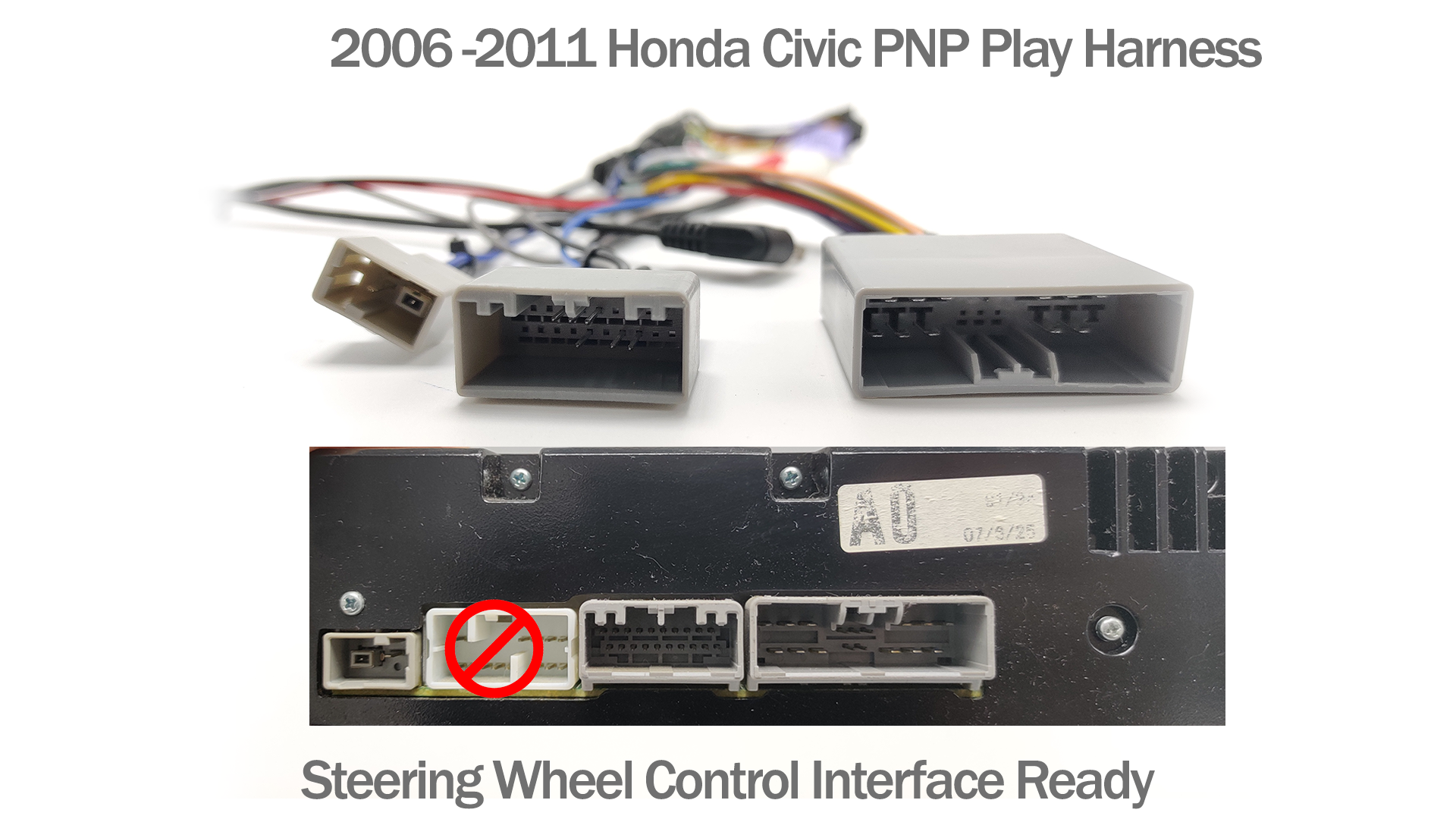
If you are having trouble wiring a new aftermarket radio in your 8th Generation Honda Civic spanning years 2006 2007 2008 2009 2010 2011 2012 then this custom made wiring harness will help. After placing your order we will create a custom wiring harness for your exact radio installation. The custom harness will allow you to install a new aftermarket radio without the need for any wire splicing or wire tapping. This harness will allow you to have a plug and play installation for your Honda Civic with a supported compatible radio. A parking bypass is highly recommended with your order if your radio brand is Pioneer, Kenwood or Alpine. You can learn more about the bypass and add one to your cart using this link.

Our plug and play harness integrates with the factory amplifier in your Honda Civic to retain your front door speakers and tweeters, the rear deck speakers and the factory subwoofer. If you are unsure if your civic is equipped with a factory amplifier, only civics with the rear factory subwoofer have a factory amplifier. If your civic is not equipped with the factory amplifier then our harness uses the aftermarket radios internal amplifier to power all of your speakers.

Included in our harness are the necessary three connectors for your Honda Civic and the radio specific connector that will plug into the back of your radio. Our harness uses RCAs to feed a low level signal from the aftermarket radio to the factory amplifier to retain all of your speakers. If your civic is not equipped with a factory amplifier standard speaker lines are used to feed audio to all your speakers directly from the aftermarket radio. We also add the connector for the AXSWC steering wheel control interface so you can retain your factory steering wheel controls if desired. The AXSWC is an additional purchase it is not included. The wiring for the AXSWC is completed so if you do purchase it you can just plug it in.

We have updated our harness to now be compatible with vehicles with navigation. The navigation equipped Honda Civic does use different connectors then the premium system so we will have to confirm with you the year and system before shipping your order. If you have navigation make sure to include a phone number where we can easily reach you with your order.

In order for your aftermarket radio to be compatible with this harness it must have at least 4 RCA outputs including FL, FR, RL, RR. Also the brand of the aftermarket radio must appear in the selection menu of this listing. If you are unsure if your radio qualifies please call us at 877-542-2872

In order to complete your order we may need your radios model number please include it in the billing checkout notes or if you forget please include a valid phone number where me may reach you in case of any questions.

FAQ.

  1. Will this harness allow me to keep my factory subwoofer with a new aftermarket radio?
    – Yes your factory amplifier gets the subwoofer signal from the rear speaker input signal.
  2. Can I add an amplifier and subwoofers with your harness?
    – Yes you can. You will just need run your RCAs to the back of the radio and wire tap the blue or blue/white wire of the harness.
  3. Can I add a backup camera with your harness?
    – Yes just follow the instructions provided in the radios owners manual or the cameras manual to complete the installation.
  4. Can I use a random radio I found on Amazon or eBay that has an unknown brand?
    – Most likely not. If the radio you purchased on Amazon is less than $100 it most likely won’t have all the features and ports needed for you to complete the installation.
  5. Do I get to keep all my speakers?
    – Yes all speakers are retained.
  6. Do I get to keep my steering wheel controls?
    -Yes but an additional part is required. The AXSWC you can find it here. You will get to keep volume up, volume down, next, prev and mode. The call control buttons will not be retained.
  7. Do I get to keep the factory AUX port?
    – Yes our harness allows you to keep the factory aux port but your new radio must have a right and left RCA Audio In.
  8. Can I use your harness if I have navigation?
    Yes our harness is now compatible with navigation equipped vehicles.

*When replacing the factory radio in your Acura you will lose the factory Sirius XM, HFL and CD Changer. *


Privacy

PRIVACY NOTICE

Last updated August 01, 2019

Thank you for choosing to be part of our community at MobileMax Car Audio LLC (“Company”, “we”, “us”, or “our”). We are committed to protecting your personal information and your right to privacy. If you have any questions or concerns about our notice, or our practices with regards to your personal information, please contact us at info@mobilemaxcaraudio.com.

When you visit our website https://mobilemaxcaraudio.com, and use our services, you trust us with your personal information. We take your privacy very seriously. In this privacy notice, we describe our privacy notice. We seek to explain to you in the clearest way possible what information we collect, how we use it and what rights you have in relation to it. We hope you take some time to read through it carefully, as it is important. If there are any terms in this privacy notice that you do not agree with, please discontinue use of our Sites and our services.

This privacy notice applies to all information collected through our website (such as https://mobilemaxcaraudio.com), and/or any related services, sales, marketing or events (we refer to them collectively in this privacy notice as the “Services“).

Please read this privacy notice carefully as it will help you make informed decisions about sharing your personal information with us.

TABLE OF CONTENTS

  1. WHAT INFORMATION DO WE COLLECT?
  2. HOW DO WE USE YOUR INFORMATION?
  3. WILL YOUR INFORMATION BE SHARED WITH ANYONE?
  4. DO WE USE COOKIES AND OTHER TRACKING TECHNOLOGIES?
  5. HOW LONG DO WE KEEP YOUR INFORMATION?
  6. HOW DO WE KEEP YOUR INFORMATION SAFE?
  7. DO WE COLLECT INFORMATION FROM MINORS?
  8. WHAT ARE YOUR PRIVACY RIGHTS?
  9. CONTROLS FOR DO-NOT-TRACK FEATURES
  10. DO CALIFORNIA RESIDENTS HAVE SPECIFIC PRIVACY RIGHTS?
  11. DO WE MAKE UPDATES TO THIS POLICY?
  12. HOW CAN YOU CONTACT US ABOUT THIS POLICY?


  1. WHAT INFORMATION DO WE COLLECT?

Information automatically collected

In Short: Some information – such as IP address and/or browser and device characteristics – is collected automatically when you visit our Services.

We automatically collect certain information when you visit, use or navigate the Services. This information does not reveal your specific identity (like your name or contact information) but may include device and usage information, such as your IP address, browser and device characteristics, operating system, language preferences, referring URLs, device name, country, location, information about how and when you use our Services and other technical information. This information is primarily needed to maintain the security and operation of our Services, and for our internal analytics and reporting purposes.

Like many businesses, we also collect information through cookies and similar technologies.

  1. HOW DO WE USE YOUR INFORMATION?

In Short: We process your information for purposes based on legitimate business interests, the fulfillment of our contract with you, compliance with our legal obligations, and/or your consent.

We use personal information collected via our Services for a variety of business purposes described below. We process your personal information for these purposes in reliance on our legitimate business interests, in order to enter into or perform a contract with you, with your consent, and/or for compliance with our legal obligations. We indicate the specific processing grounds we rely on next to each purpose listed below.

We use the information we collect or receive:

  • To facilitate account creation and logon process. If you choose to link your account with us to a third party account *(such as your Google or Facebook account), we use the information you allowed us to collect from those third parties to facilitate account creation and logon process for the performance of the contract.
  • To send you marketing and promotional communications. We and/or our third party marketing partners may use the personal information you send to us for our marketing purposes, if this is in accordance with your marketing preferences. You can opt-out of our marketing emails at any time (see the “ WHAT ARE YOUR PRIVACY RIGHTS ” below).
  • To send administrative information to you. We may use your personal information to send you product, service and new feature information and/or information about changes to our terms, conditions, and policies.
  • Fulfill and manage your orders. We may use your information to fulfill and manage your orders, payments, returns, and exchanges made through the Services.
  • To post testimonials. We post testimonials on our Services that may contain personal information. Prior to posting a testimonial, we will obtain your consent to use your name and testimonial. If you wish to update, or delete your testimonial, please contact us at info@mobilemaxcaraudio.com and be sure to include your name, testimonial location, and contact information.
  • Deliver targeted advertising to you. We may use your information to develop and display content and advertising (and work with third parties who do so) tailored to your interests and/or location and to measure its effectiveness.
  • Administer prize draws and competitions. We may use your information to administer prize draws and competitions when you elect to participate in competitions.
  • Request Feedback. We may use your information to request feedback and to contact you about your use of our Services.
  • To protect our Services. We may use your information as part of our efforts to keep our Services safe and secure (for example, for fraud monitoring and prevention).
  • To enable user-to-user communications. We may use your information in order to enable user-to-user communications with each user’s consent.
  • To enforce our terms, conditions and policies for Business Purposes, Legal Reasons and Contractual.
  • To respond to legal requests and prevent harm. If we receive a subpoena or other legal request, we may need to inspect the data we hold to determine how to respond.
  • To manage user accounts. We may use your information for the purposes of managing our account and keeping it in working order.
  • To deliver services to the user. We may use your information to provide you with the requested service.
  • To respond to user inquiries/offer support to users. We may use your information to respond to your inquiries and solve any potential issues you might have with the use of our Services.
  • For other Business Purposes. We may use your information for other Business Purposes, such as data analysis, identifying usage trends, determining the effectiveness of our promotional campaigns and to evaluate and improve our Services, products, marketing and your experience. We may use and store this information in aggregated and anonymized form so that it is not associated with individual end users and does not include personal information. We will not use identifiable personal information without your consent.
  1. WILL YOUR INFORMATION BE SHARED WITH ANYONE?

In Short: We only share information with your consent, to comply with laws, to provide you with services, to protect your rights, or to fulfill business obligations.

We may process or share data based on the following legal basis:

  • Consent: We may process your data if you have given us specific consent to use your personal information in a specific purpose. 
  • Legitimate Interests: We may process your data when it is reasonably necessary to achieve our legitimate business interests. 
  • Performance of a Contract: Where we have entered into a contract with you, we may process your personal information to fulfill the terms of our contract. 
  • Legal Obligations: We may disclose your information where we are legally required to do so in order to comply with applicable law, governmental requests, a judicial proceeding, court order, or legal process, such as in response to a court order or a subpoena (including in response to public authorities to meet national security or law enforcement requirements). 
  • Vital Interests: We may disclose your information where we believe it is necessary to investigate, prevent, or take action regarding potential violations of our policies, suspected fraud, situations involving potential threats to the safety of any person and illegal activities, or as evidence in litigation in which we are involved.

More specifically, we may need to process your data or share your personal information in the following situations:

  • Vendors, Consultants and Other Third-Party Service Providers. We may share your data with third party vendors, service providers, contractors or agents who perform services for us or on our behalf and require access to such information to do that work. Examples include: payment processing, data analysis, email delivery, hosting services, customer service and marketing efforts. We may allow selected third parties to use tracking technology on the Services, which will enable them to collect data about how you interact with the Services over time. This information may be used to, among other things, analyze and track data, determine the popularity of certain content and better understand online activity. Unless described in this Policy, we do not share, sell, rent or trade any of your information with third parties for their promotional purposes.
  • Business Transfers. We may share or transfer your information in connection with, or during negotiations of, any merger, sale of company assets, financing, or acquisition of all or a portion of our business to another company.
  • Third-Party Advertisers. We may use third-party advertising companies to serve ads when you visit the Services. These companies may use information about your visits to our Website(s) and other websites that are contained in web cookies and other tracking technologies in order to provide advertisements about goods and services of interest to you.
  1. DO WE USE COOKIES AND OTHER TRACKING TECHNOLOGIES?

In Short: We may use cookies and other tracking technologies to collect and store your information.

We may use cookies and similar tracking technologies (like web beacons and pixels) to access or store information. Specific information about how we use such technologies and how you can refuse certain cookies is set out in our Cookie Policy.

  1. HOW LONG DO WE KEEP YOUR INFORMATION?

In Short: We keep your information for as long as necessary to fulfill the purposes outlined in this privacy notice unless otherwise required by law.

We will only keep your personal information for as long as it is necessary for the purposes set out in this privacy notice, unless a longer retention period is required or permitted by law (such as tax, accounting or other legal requirements). No purpose in this policy will require us keeping your personal information for longer than the period of time in which users have an account with us .

When we have no ongoing legitimate business need to process your personal information, we will either delete or anonymize it, or, if this is not possible (for example, because your personal information has been stored in backup archives), then we will securely store your personal information and isolate it from any further processing until deletion is possible.

  1. HOW DO WE KEEP YOUR INFORMATION SAFE?

In Short: We aim to protect your personal information through a system of organizational and technical security measures.

We have implemented appropriate technical and organizational security measures designed to protect the security of any personal information we process. However, please also remember that we cannot guarantee that the internet itself is 100% secure. Although we will do our best to protect your personal information, transmission of personal information to and from our Services is at your own risk. You should only access the services within a secure environment.

  1. DO WE COLLECT INFORMATION FROM MINORS?

In Short: We do not knowingly collect data from or market to children under 18 years of age.

We do not knowingly solicit data from or market to children under 18 years of age. By using the Services, you represent that you are at least 18 or that you are the parent or guardian of such a minor and consent to such minor dependent’s use of the Services. If we learn that personal information from users less than 18 years of age has been collected, we will deactivate the account and take reasonable measures to promptly delete such data from our records. If you become aware of any data we have collected from children under age 18, please contact us at info@mobilemaxcaraudio.com.

  1. WHAT ARE YOUR PRIVACY RIGHTS?

In Short: You may review, change, or terminate your account at any time.

If you are resident in the European Economic Area and you believe we are unlawfully processing your personal information, you also have the right to complain to your local data protection supervisory authority. You can find their contact details here: http://ec.europa.eu/justice/data-protection/bodies/authorities/index_en.htm

Account Information

If you would at any time like to review or change the information in your account or terminate your account, you can:

Log into your account settings and update your user account.

Upon your request to terminate your account, we will deactivate or delete your account and information from our active databases. However, some information may be retained in our files to prevent fraud, troubleshoot problems, assist with any investigations, enforce our Terms of Use and/or comply with legal requirements.

Cookies and similar technologies: Most Web browsers are set to accept cookies by default. If you prefer, you can usually choose to set your browser to remove cookies and to reject cookies. If you choose to remove cookies or reject cookies, this could affect certain features or services of our Services. To opt-out of interest-based advertising by advertisers on our Services visit http://www.aboutads.info/choices/ .

Opting out of email marketing: You can unsubscribe from our marketing email list at any time by clicking on the unsubscribe link in the emails that we send or by contacting us using the details provided below. You will then be removed from the marketing email list – however, we will still need to send you service-related emails that are necessary for the administration and use of your account. To otherwise opt-out, you may:

Access your account settings and update preferences.

  1. CONTROLS FOR DO-NOT-TRACK FEATURES

Most web browsers and some mobile operating systems and mobile applications include a Do-Not-Track (“DNT”) feature or setting you can activate to signal your privacy preference not to have data about your online browsing activities monitored and collected. No uniform technology standard for recognizing and implementing DNT signals has been finalized. As such, we do not currently respond to DNT browser signals or any other mechanism that automatically communicates your choice not to be tracked online. If a standard for online tracking is adopted that we must follow in the future, we will inform you about that practice in a revised version of this privacy notice.

  1. DO CALIFORNIA RESIDENTS HAVE SPECIFIC PRIVACY RIGHTS?

In Short: Yes, if you are a resident of California, you are granted specific rights regarding access to your personal information.

California Civil Code Section 1798.83, also known as the “Shine The Light” law, permits our users who are California residents to request and obtain from us, once a year and free of charge, information about categories of personal information (if any) we disclosed to third parties for direct marketing purposes and the names and addresses of all third parties with which we shared personal information in the immediately preceding calendar year. If you are a California resident and would like to make such a request, please submit your request in writing to us using the contact information provided below.

If you are under 18 years of age, reside in California, and have a registered account with the Services, you have the right to request removal of unwanted data that you publicly post on the Services. To request removal of such data, please contact us using the contact information provided below, and include the email address associated with your account and a statement that you reside in California. We will make sure the data is not publicly displayed on the Services, but please be aware that the data may not be completely or comprehensively removed from our systems.

  1. DO WE MAKE UPDATES TO THIS POLICY?

In Short: Yes, we will update this policy as necessary to stay compliant with relevant laws.

We may update this privacy notice from time to time. The updated version will be indicated by an updated “Revised” date and the updated version will be effective as soon as it is accessible. If we make material changes to this privacy notice, we may notify you either by prominently posting a notice of such changes or by directly sending you a notification. We encourage you to review this privacy notice frequently to be informed of how we are protecting your information.

  1. HOW CAN YOU CONTACT US ABOUT THIS POLICY?

If you have questions or comments about this policy, you may email us at info@mobilemaxcaraudio.com or by post to:

MobileMax Car Audio LLC
132 Robinwood Dr
SHIRLEY, NY 11967
United States